A good nonprofit Google ad does four things in order: it names the need the searcher already cares about, says specifically what a gift does about it, gives a reason to trust the organization, and offers one clear next step. Everything else, from photos to sitelinks to video, either supports that sequence or gets in its way. The rest is testing, honestly measured.
- Why nonprofit ads are different
- The five-part blueprint
- Anatomy of a strong search ad
- Match the ad to the search
- Writing headlines and descriptions
- Imagery: real stories, with dignity
- Calls to action and sitelinks
- Different missions, different promises
- Search, image and video
- Google Ad Grants and Microsoft Ads
- What’s proven and what to test
- Four tests worth running
- Measure gifts, not clicks
- Pre-launch checklist
- FAQ
Most advice about Google Ads is written for companies selling something. A nonprofit is asking for something harder: money with nothing tangible in return, often from a stranger, often in the middle of bad news. That changes how an ad should be written, which pictures belong in it, and what “success” even means.
This guide walks through how I think about paid search and display ads for charities, using a set of fictional disaster-relief organizations as examples. The organizations, logos and ads are made up for teaching. The principles come from Google’s own documentation, fundraising research and the day-to-day work of running donation campaigns.
Why nonprofit ads are different
A shopper searching for running shoes already wants running shoes. Your ad just has to be the most convincing option. A donor is different in three ways.
The “product” is invisible. Nobody receives a box when they give. The ad has to make an outcome real (a meal served, a roof repaired, a clinic staffed) using only words and maybe one image.
Trust does most of the work. People are giving to an organization they may have never heard of, sometimes right after a disaster, when scams are common. Who you are and how you’ll use the money matters more than in almost any commercial ad.
Intent varies wildly. Someone searching “donate to hurricane relief” is ready to give now. Someone searching “how do charities help after floods” is still deciding. Someone searching “CPR classes near me” may be on your website for an entirely different reason. One ad can’t serve all three.
Get those three things right and the rest of this guide is refinement.
The five-part blueprint
Think of a strong nonprofit ad as a short chain of logic. If any link is missing, the chain breaks:
- Match the donor’s intent. If the search is about a specific disaster, the headline should be about that disaster, and the click should land on a page about it. Google’s own guidance is blunt about this: “Users respond to ads that speak to their needs.”
- Name a concrete benefit without inventing impact. “Help provide emergency meals” is clearer than “Make a difference.” But only promise what your programs actually deliver. If you can’t verify a cost-per-meal figure or a delivery timeline, leave it out.
- Show a truthful human story. A real person, shown with consent and dignity, can make a cause understandable in a way statistics rarely do.
- Give one prominent action, with optional side doors. “Give Now” for people who are ready. “How It Helps” for people who need convincing. Not five equal buttons competing for attention.
- Keep the promise after the click. The landing page should repeat the need from the ad, show real program details and make the donation form easy to find, especially on a phone.
The goal isn’t an attractive image or a high click-through rate. It’s an accurately represented need and a measurable, useful action from the donor.
Anatomy of a strong search ad
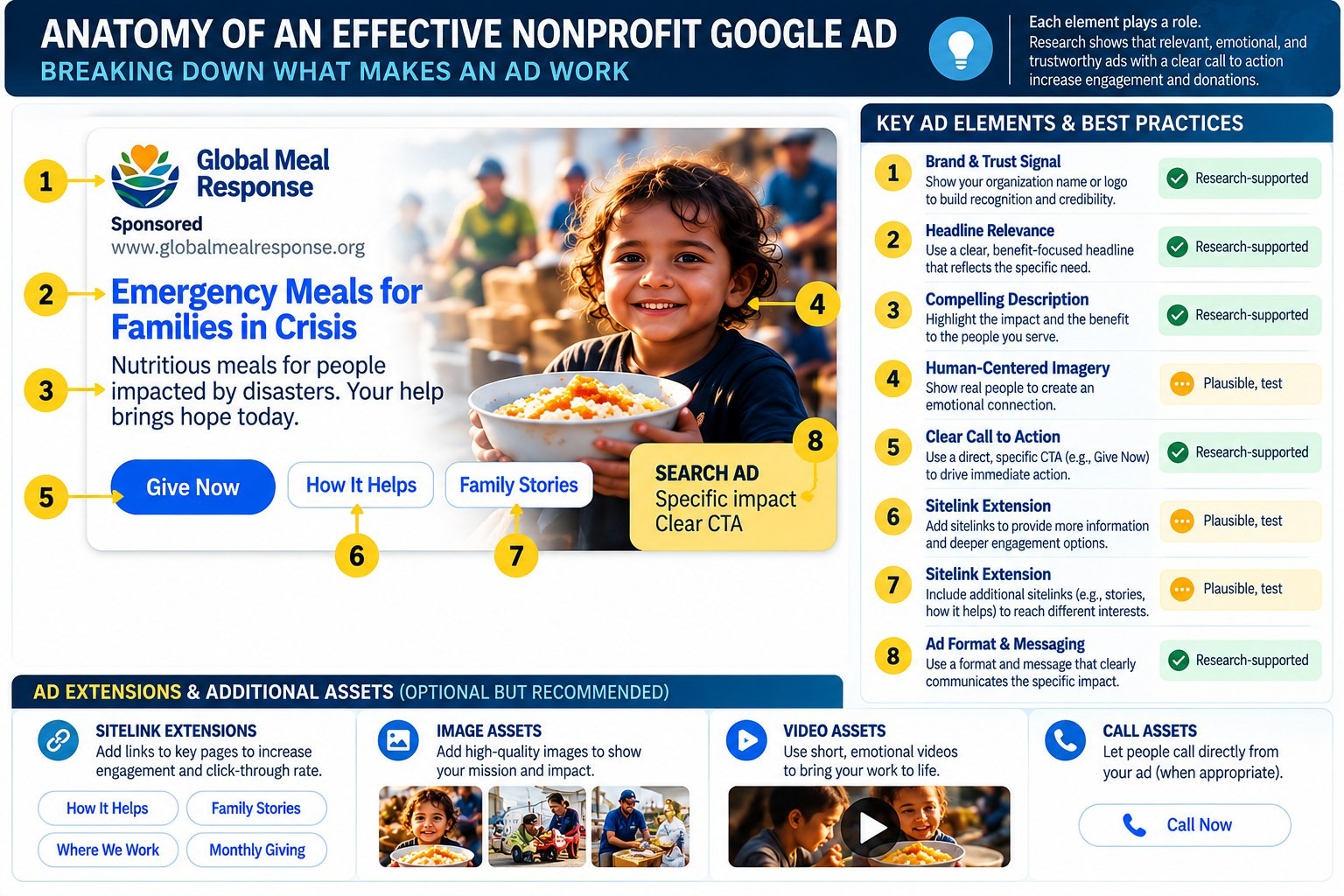
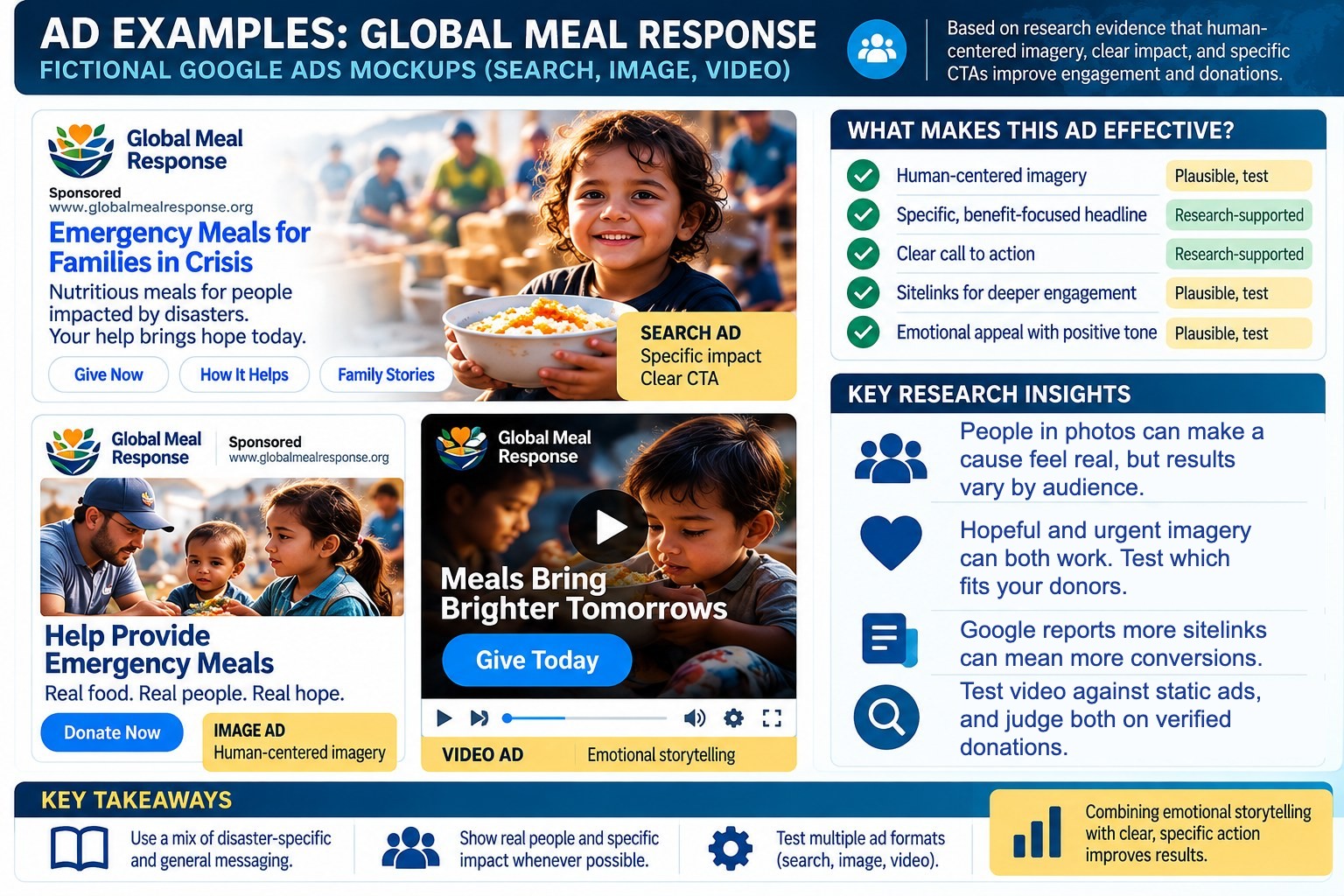
Here’s what each part of that ad is doing, and why it’s there.
1. Brand and trust signal
The organization’s name and website appear first. For a donor, this is the “can I trust you?” check. A clear, consistent name across your ads, website and Google Business Profile does more than any clever slogan.
2. A headline that matches the need
“Emergency Meals for Families in Crisis” tells the searcher, in six words, what the gift does and who it helps. Compare that with “Make a Difference Today,” which could be an ad for anything.
3. A description that explains the benefit
One or two plain sentences: what you provide, to whom, and why now. Write like you’d explain it to a friend, not like a mission statement.
4. Human-centered imagery
Where the format allows images, a real face often explains the work faster than a logo or a building. More on doing this ethically below.
5. A clear call to action
“Give Now” or “Donate Now.” Short, specific, and the same words as the button on the landing page.
6 and 7. Sitelinks for different kinds of donors
“How It Helps” and “Family Stories” give hesitant donors somewhere to go besides away. They’re side doors, not the front door.
8. A format that fits the message
A search ad is best for a specific need with a clear action. Image and video ads are better for telling a story to people who weren’t searching yet.
Match the ad to the search, not the other way around
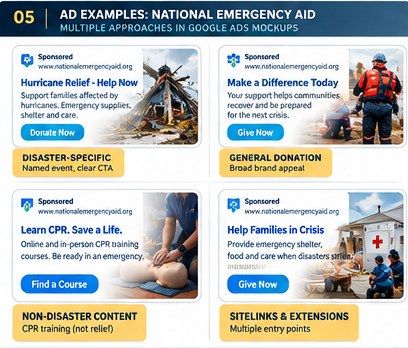
Many nonprofits run one “donate” ad against every keyword they own. It’s simpler, and it’s usually a mistake. Look at the four ads above from our fictional National Emergency Aid:
- Disaster-specific (“Hurricane Relief: Help Now”). Right for searches about a named event, but only if your organization is truly responding there. Never run a disaster headline for an event you aren’t working on.
- General donation (“Make a Difference Today”). Useful for year-round giving, preparedness and brand searches, when there’s no single crisis in the news.
- Non-disaster content (“Learn CPR. Save a Life.”). A completely different person with a completely different goal. They want a class, not a donation form. Put this in its own campaign with its own success metric.
- Sitelinks and extensions. Multiple entry points for people who want to learn more before they commit.
In practice, this means organizing your account by intent: a campaign for active disasters (switched on and off as events happen), one for evergreen giving, one for your brand name, and separate campaigns for programs like training or volunteering. It’s more setup, but your ads and your reporting both get far clearer.
Writing headlines and descriptions that earn the click
Most Google search ads today are responsive search ads. You supply up to 15 headlines and 4 descriptions, and Google mixes and matches them for each search. Google recommends adding as many unique, high-quality options as you can and avoiding “pinning” unless you have a specific reason, because pinning limits the combinations the system can test.
For nonprofits, a few habits make that pool of headlines much stronger:
- Write headlines in three families. Need (“Families Lost Everything in the Floods”), response (“Emergency Food, Water and Shelter”) and action (“Give Today to Help Flood Victims”). Any combination Google picks will still tell a complete story.
- Use the searcher’s words. If people search “hurricane relief donation,” at least one headline should say “Hurricane Relief.” Google’s own example pairs a “digital cameras” keyword with a “Buy Digital Cameras” headline. The same logic applies to giving.
- Be specific, but only with facts you can back up. “Meals, water and hygiene kits” beats “help.” But don’t write “$1 provides 5 meals” unless your finance team will stand behind that number.
- Skip the generic calls to action. Google notes that “generic calls to action often show decreased engagement with ads.” “Click here” and “Learn more” waste a headline slot.
- Use urgency only when it’s real. “Matching gifts end Friday” is powerful when there’s a real match. If there isn’t, it’s a broken promise and, in some cases, a legal problem.
A note on claims. Every number, deadline, match and location in a nonprofit ad should be verified with the people who run the program. Donors forgive a plain ad. They don’t forgive one that turns out to be untrue.
Imagery: real stories, shown with dignity
There’s good research behind putting a person at the center of an appeal. In a well-known set of experiments, Deborah Small, George Loewenstein and Paul Slovic found people gave more to help a single identifiable child than in response to statistics about millions in need. Adding the statistics to the child’s story actually reduced giving. As Small put it, “it’s hard for humans to generate feelings toward statistics.”
That’s a useful insight, not a rule that every ad needs a smiling child. A few cautions matter just as much:
- No single photo style is proven best for every audience. Hopeful images and urgent images both work in different contexts. Test them rather than assuming.
- Consent and dignity come first. Use photos of people who agreed to be photographed for this purpose, and show them as people with agency, not as props for pity.
- Be honest about stock images. If a photo isn’t from your actual work, don’t caption it as if it were.
- Match the image to the promise. A meal appeal should show food reaching people. A rebuilding appeal should show rebuilding.
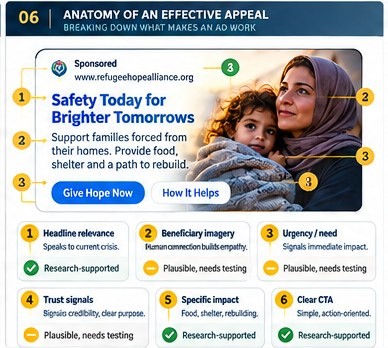
Calls to action and sitelinks
Your main call to action should match how ready the searcher is. “Give Now” fits someone who searched “donate to flood relief.” Someone who searched “best disaster relief charities” may need “See How We Help” first.
Sitelinks are the extra links that can appear under a search ad. Google’s help page says an ad can show up to 6 sitelinks on desktop and up to 8 on mobile, and you need at least 2 for them to appear. Google also reports that advertisers who raise the number of sitelinks per campaign to 6 can see “up to 3.5% more conversions at a similar cost per conversion.” That’s Google’s average, not a promise for your campaign, but it’s a strong reason to fill them in.
Good nonprofit sitelinks usually include:
- How It Helps: where the money goes, in plain language
- Stories: real people and outcomes
- Where We Work: for donors who care about a specific place
- Monthly Giving: for supporters who’d rather give a little every month
Treat each one as a page worth landing on. A sitelink to a thin or outdated page does more harm than having no sitelink at all.
Different missions need different promises
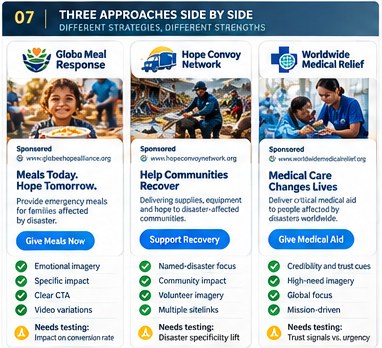
A meal program, a rebuilding crew and a medical team shouldn’t sound the same, even if they respond to the same disaster.
- Meals: explain the service and how a gift supports it. “Meals Today. Hope Tomorrow.” works because it’s simple and concrete.
- Recovery: be specific about where you’re working and what you’re actually rebuilding. Donors to recovery work often want to know it’s long-term.
- Medical aid: verify every professional role, supply and delivery claim. Medical ads carry extra weight with donors, and extra risk if anything is overstated.
If you run more than one kind of program, give each its own ad group and landing page instead of blending them into a single “support our work” message.
Search, image and video: when each one fits
| Format | Best for | Watch out for |
|---|---|---|
| Search | People already looking to give or learn. Specific needs with a clear action. | Generic headlines that ignore what was searched. |
| Image (display, Demand Gen, Performance Max) | Reaching people who weren’t searching, with a human story. | Cluttered images, tiny text and photos that don’t match the promise. |
| Video (YouTube) | Showing the work in action and building emotional connection. | Long intros. The first few seconds have to carry the message. |
One correction worth making: a real Google search ad isn’t a fixed bundle of a photo, a button and a video. The graphics above combine formats for teaching. What actually appears depends on the campaign type and which assets Google decides to show.
Google Ad Grants and Microsoft (Bing) Ads
Google Ad Grants offers qualifying nonprofits up to $10,000 a month in free search advertising on Google.com. The grant comes with its own policies and limits, so many organizations run a grant account for education and awareness keywords alongside a paid Google Ads account for competitive donation keywords. Check Google’s current eligibility rules before you plan around it.
Microsoft Advertising (the network behind Bing search) is worth considering as well. Its audience skews differently from Google’s, and well-built Google campaigns can be brought over without starting from scratch. One change to know about: Microsoft ended its nonprofit grant program, Ads for Social Impact, with the last grants awarded in November 2025, according to The NonProfit Times. Bing ads for nonprofits are now regular paid campaigns, so budget for them that way.
The principles in this guide apply on both platforms. Match intent, be specific and truthful, show real people, and make the next step obvious.
What’s proven, and what you still have to test
Well supported as practical guidance: relevant copy that matches the search, a variety of quality assets, a specific call to action, a landing page that keeps the ad’s promise, accurate claims and conversion tracking that actually works. Google’s documentation supports all of these, though results vary by account.
Good psychology, but not a guaranteed winner: identifiable people and emotionally meaningful stories can increase giving. The research doesn’t prove that any particular photo, tone or face will maximize online donations for your organization.
Test, don’t declare: smiling versus distressed imagery, video versus static images, urgency versus hope, named disasters versus general relief, and which call to action produces the most verified donation value.
Four tests worth running
If you only have budget for a few experiments, these four answer the questions that matter most for disaster and relief fundraising:
| Test | Version A | Version B |
|---|---|---|
| 1. Message specificity | Named disaster plus your verified response | General emergency support |
| 2. Emotional frame | Hope and recovery | Urgency and need |
| 3. Proof of impact | A specific, verified service outcome | A broader mission description |
| 4. Creative format | Static image | Short video |
For every test, keep the targeting, timing, budget and landing page the same, so the only thing that changes is the thing you’re testing. Use one primary metric for all four: verified donation conversion rate, or donation revenue per landing-page visitor. Decide in advance how long the test will run and what result would make you switch.
Measure gifts, not clicks
Click-through rate is easy to raise and easy to misread. A dramatic headline can double your clicks and halve your donations if the people clicking weren’t really ready to give. The same goes for video views and engagement.
Before judging any ad, confirm three things:
- Your donation form fires a conversion when a gift actually completes, not when the page loads.
- The conversion carries the real gift amount, so you can compare revenue, not just counts.
- Non-donation actions (newsletter sign-ups, kit downloads, volunteer forms) are tracked separately, so they don’t inflate your donation numbers.
Google also notes that responsive search ads enter more auctions, so it recommends judging them on incremental impressions, clicks and conversions, not just ad-level click-through rate.
Pre-launch checklist
- The headline matches what this audience is actually searching for.
- Every person pictured is properly licensed, has consented and is shown with dignity.
- No unsupported urgency, matching gift, location or cost-per-unit claim.
- The organization’s name and purpose are clear at a glance.
- The call to action matches the landing page and the donor’s readiness.
- The landing page works well on a phone and repeats the ad’s promise.
- Donation tracking and gift values are tested and working.
- Every test has one clear hypothesis and a success metric chosen in advance.
- Any fictional or illustrative example is labeled as such in public materials.
Frequently asked questions
What makes a good Google ad for a nonprofit?
A good nonprofit ad matches what the person searched for, says specifically what a gift accomplishes, makes it clear who the organization is and offers one obvious next step, like “Give Now.” The landing page then repeats that promise and makes donating easy.
Should nonprofit ads use photos of children?
Photos of real people can make a cause easier to understand, and research on identifiable victims supports putting a person at the center of an appeal. That doesn’t mean children always perform best. Use images with consent, show people with dignity, match the photo to the program, and test different approaches.
How many sitelinks should a nonprofit search ad have?
Google requires at least 2 sitelinks for them to show and can display up to 6 on desktop and 8 on mobile. Google reports that moving to 6 sitelinks per campaign can lead to more conversions on average, so it’s worth adding pages like “How It Helps,” “Stories” and “Monthly Giving.”
Is click-through rate a good way to judge a nonprofit ad?
Not on its own. An ad can earn more clicks while bringing in fewer gifts. Judge ads on verified donations and donation revenue per visitor, with tracking you’ve confirmed works.
Do Google Ad Grants and Microsoft Ads grants still exist?
Google Ad Grants still offers qualifying nonprofits up to $10,000 a month in search ads on Google.com. Microsoft ended its Ads for Social Impact grant program in late 2025, so Microsoft Advertising campaigns are now regular paid campaigns.
How I use this in my own work
I’ve spent the last several years doing digital marketing for a national disaster-relief nonprofit, through agency work: search, email, partner media and landing pages, often launched within days of a disaster. The case studies below show how these principles play out on real campaigns, with names and details changed for privacy.
- Texas Floods 2025: an emergency multichannel campaign in days
- Rebuilding a church partnership page with AI-assisted content analysis
- More on my nonprofit digital marketing experience
Running ads for a nonprofit and not sure they’re working? I’ll review your campaigns and landing pages and tell you what I’d test first.
Get a nonprofit ads reviewHire MichaelSources
- Google Ads Help: Best practices for creating effective responsive search ads
- Google Ads Help: About responsive search ads
- Google Ads Help: About sitelink assets
- Google for Nonprofits: Google Ad Grants
- The NonProfit Times: Microsoft Ends Nonprofit-Focused Ads for Social Impact Grants (October 2025)
- Small, Loewenstein and Slovic, “Sympathy and callousness: The impact of deliberative thought on donations to identifiable and statistical victims,” Organizational Behavior and Human Decision Processes (2007)
- Stanford Graduate School of Business: To Increase Charitable Donations, Appeal to the Heart, Not the Head
- M+R Benchmarks: annual nonprofit digital fundraising and advertising benchmarks
About the examples in this guide: Global Meal Response, National Emergency Aid, Refugee Hope Alliance, Hope Convoy Network and Worldwide Medical Relief are fictional organizations. Their ads, logos, websites and photos are illustrative mockups created for teaching, not live Google Ads, real charities or demonstrated campaign results. No real campaign performance data is shown. The “research-supported” and “plausible, test” labels inside the graphics summarize the general guidance in this article and are not independent validation of any specific ad.

- From Listening to Leads: Turn Customer Words Into Marketing - November 17, 2026
- Social Listening on a $0 Budget: A 30-Minute Weekly Routine - November 10, 2026
- Reviews After AI: What Buyers Check Before They Trust You - November 3, 2026
- Reddit and AI Search: Why Small Threads Shape Your Reputation - October 27, 2026
- What Does AI Say About Your Brand? A 10-Minute Check - October 20, 2026
- How to Write Google Ads for Nonprofits: A Practical Guide to Donation Ads That Work - October 13, 2026
- AEO and GEO for Small Businesses: How to Get Cited by ChatGPT, Perplexity and Google’s AI - October 5, 2026
- 10 Web Content Marketing Mistakes Hurting Your Business - June 3, 2018
- Seo tips for small businesses - May 26, 2018
- Picture Perfect SEO - May 26, 2018